By: Jeff Hirz
ERP eCommerce integration starts with a simple question: you need your ERP and your eCommerce website to talk to each other, so where do you start?
The wrong starting point is usually the connector. Before your team chooses an app, middleware platform, API route, or development partner, you need to know which system owns each piece of data, which direction that data should move, how often it should sync, and what happens when something fails. That planning step is what turns ERP and eCommerce integration from a vague technical request into a buildable project.
ERP eCommerce Integration: The Short Answer
ERP eCommerce integration connects an online store with the back-office system that manages business data. That makes ecommerce ERP integration less about one connector and more about how each system handles products, pricing, inventory, customers, and orders. In most projects, the integration moves product data, pricing, inventory, customer accounts, orders, invoices, fulfillment updates, and payment or credit information between the ERP and the website.
The details matter. A small direct-to-consumer store may only need inventory and order sync. A B2B distributor may need customer-specific pricing, contract terms, quote workflows, warehouse rules, sales rep visibility, and account hierarchies. Both projects are ERP eCommerce work, but they are not the same scope.
What ERP eCommerce Integration Actually Connects
An ERP is usually the operational source of truth. It may hold products, SKUs, inventory, purchasing, accounting, customer records, order status, shipping data, invoices, payment terms, tax rules, and financial reporting. Common ERP examples include SAP, NetSuite, Microsoft Dynamics, Sage, Oracle, Acumatica, and industry-specific systems.
Your eCommerce website is the customer-facing buying layer. It presents products, categories, search, account tools, pricing, cart, checkout, quote requests, shipping options, payment options, order confirmations, and post-purchase account information. The site may run on Shopify, BigCommerce, WooCommerce, Adobe Commerce, Magento, a custom platform, or another commerce system.
The integration is the bridge between those layers. When it works well, customers see accurate product and account information, operations receives clean orders, and teams spend less time copying data between systems. When it is underplanned, the website may show stale stock, wrong prices, incomplete order records, duplicate customers, or fulfillment status that does not match reality.

Start With Data Ownership Before You Talk About Connectors
A successful eCommerce website integration with ERP starts with planning because the same field can mean different things in different systems. “Price” might mean list price, customer-specific price, contract price, sale price, tiered quantity price, or negotiated quote price. “Inventory” might mean on-hand units, available-to-sell units, reserved units, dropship availability, or warehouse-specific availability.
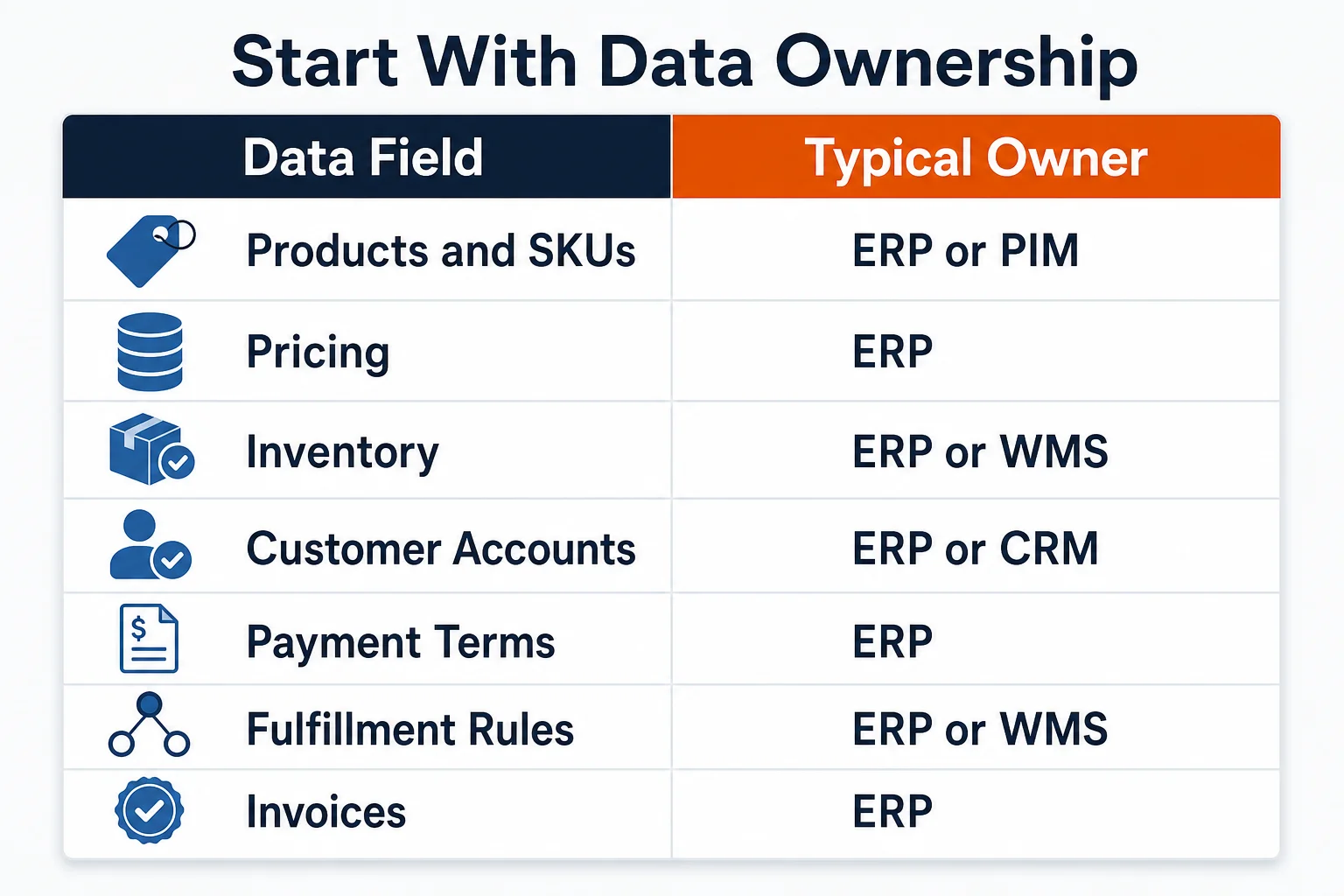
Before anyone estimates development work, identify the owner for each data field. The owner might be the ERP, a product information management system, the eCommerce platform, a warehouse management system, a CRM, a tax tool, a shipping tool, or a middleware layer. Once ownership is clear, the team can decide where data originates, where it is displayed, where it can be edited, and how conflicts are handled.
This is where many projects become expensive. If an agency is guessing at data ownership during the proposal phase, assumptions can surface halfway through the build. That creates rework for the development team and frustration for the business team. The more you can map up front, the cleaner the quote and build process will be.
ERP Data Is a Two-Way Street
The most useful way to think about ERP and eCommerce integration is as two separate flows.
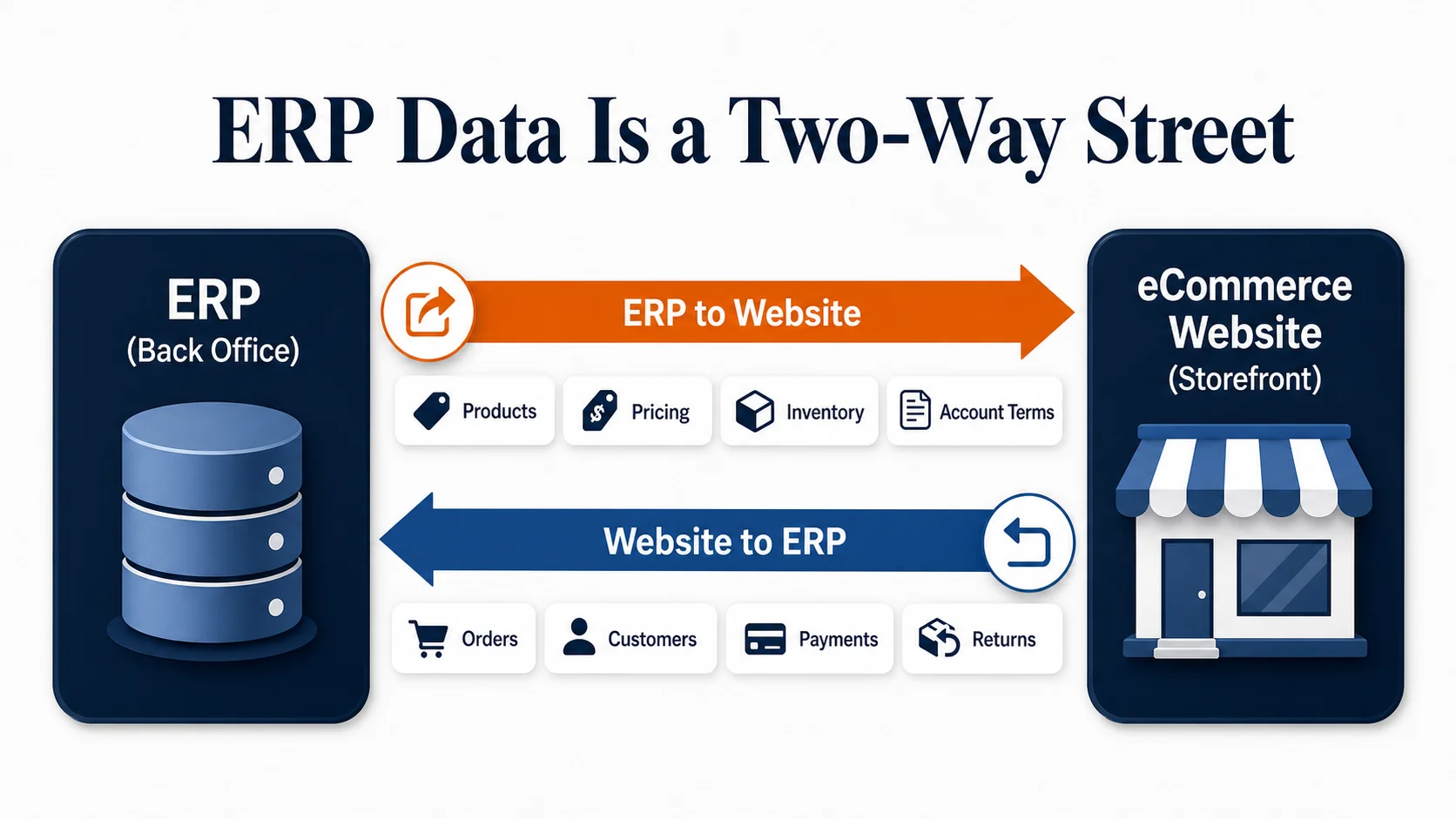
First, the ERP sends data to the website. That data helps customers browse, evaluate, buy, reorder, or request a quote. Product records, pricing, inventory, terms, and account data often move in this direction.
Second, the website sends data back to the ERP. That data helps the business process orders, update customer records, generate invoices, fulfill shipments, post transactions, or support sales teams. Orders, customer updates, payment status, quote requests, and returns often move in this direction.
Do not assume the same rules apply to both flows. Product updates may run on a schedule. Inventory may need faster updates. B2B price lists may require stricter controls. Orders may need validation before they are accepted into the ERP. Each flow needs its own owner, format, timing, validation rules, and error-handling plan.
ERP to Website Data: What Usually Moves Downstream
ERP-to-website data is what the eCommerce site needs to show customers accurate information.
| Data Type | Typical Owner | Website Use | Planning Question |
|---|---|---|---|
| Product records and SKUs | ERP or PIM | Product pages, variants, search, categories | Which fields are customer-facing, and which should stay internal? |
| Pricing | ERP | Product pages, account portals, cart, quote flows | Is pricing public, customer-specific, tiered, or contract-based? |
| Inventory and availability | ERP, WMS, or warehouse system | Stock messages, backorder rules, pickup/shipping options | Should the site show exact units, availability bands, or request-quote messaging? |
| Customer accounts | ERP or CRM | Login, company account, saved terms, reorder tools | Which system owns company records and buyer permissions? |
| Payment terms and credit limits | ERP | B2B checkout, PO workflows, account status | Should credit status block checkout or route to review? |
| Fulfillment and shipping rules | ERP, WMS, or shipping tool | Delivery options, warehouse routing, order status | Which warehouse, carrier, or shipping method rules apply online? |
| Invoices and open balances | ERP | Account dashboard and payment portal | Should customers see invoices online, pay them online, or both? |
Some of this data can be cached without creating much risk. Other data, such as inventory or account-specific pricing, may need tighter sync rules. The right answer depends on the business process, product type, order volume, and customer expectations.
Website to ERP Data: What Usually Moves Back
Website-to-ERP data is what the business needs after a customer interacts with the store.
| Data Type | Typical Origin | ERP Use | Planning Question |
|---|---|---|---|
| Orders | eCommerce website | Order processing, accounting, fulfillment | Does the ERP need line-item detail, payment detail, tax detail, and discounts? |
| Customer registrations | eCommerce website | Account creation, CRM/account matching | Should new accounts be auto-created or reviewed first? |
| Quote requests | Website or account portal | Sales workflow, pricing review, quote generation | Which fields are required before sales can quote accurately? |
| Payments and authorizations | Payment gateway or website | Cash application, reconciliation, order release | Does the ERP need authorization, capture, transaction, or payout detail? |
| PO numbers | B2B checkout | Accounts receivable and customer reference | Are PO numbers required for some accounts? |
| Returns and cancellations | Website or customer service | Inventory, accounting, customer history | Which system controls return approval and status updates? |
| Shipment selections | Website checkout | Fulfillment and cost calculation | Can customers choose from ERP-controlled shipping rules? |
This is where the details affect operations. A web order that looks simple to the customer may need to create several ERP records, trigger fulfillment logic, update inventory, post tax, attach payment data, and notify a sales rep. If the ERP cannot accept a field exactly as the website sends it, the integration needs transformation logic.
Choose the Right ERP eCommerce Integration Method
There are four common ways to connect ERP and eCommerce systems, and each ecommerce integration with ERP should be chosen around data ownership, sync timing, and error handling.
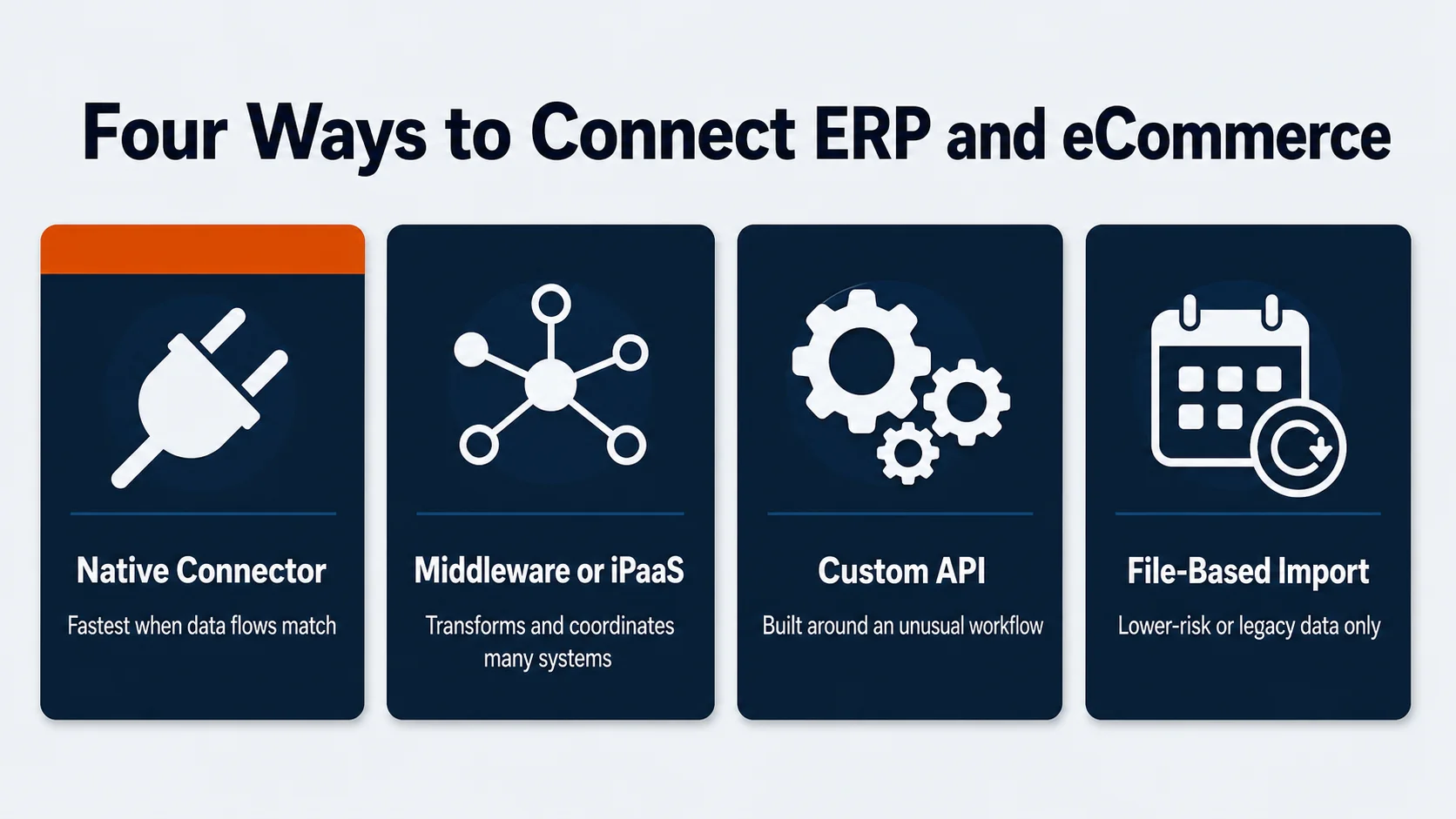
Native connectors or apps are usually the fastest path when your ERP, platform, and business requirements match the connector’s supported data flows. For example, Shopify’s B2B documentation lists direct integrations, iPaaS integrations, and custom APIs as options for connecting external systems, including ERPs, CRMs, and PIMs.
Middleware or iPaaS platforms sit between systems. They can transform data, map fields, monitor sync jobs, retry failed records, and connect multiple systems. This can be useful when an ERP, website, marketplace, 3PL, CRM, and accounting process all need to coordinate.
Custom API integrations are built around your specific workflow. They can be the right route when the business process is unusual, when a prebuilt connector does not support the necessary objects, or when performance and control matter. They also require more planning, development, QA, monitoring, and maintenance.
File-based or scheduled imports can work for lower-risk data, legacy systems, or temporary bridges. They are usually a poor fit for time-sensitive inventory, pricing, or order workflows unless everyone understands the latency and reconciliation tradeoffs.
The best method is the one that fits the data, timing, error-handling, and ownership requirements. A connector is not automatically safer than custom work. Custom work is not automatically better than middleware. The fit depends on the operating model.
What Drives ERP eCommerce Integration Cost
ERP eCommerce integration cost depends on scope, not just the platform names. A Shopify-to-ERP connector with standard objects can be a different project from a custom B2B portal with account pricing, quotes, invoices, multiple warehouses, tax rules, and legacy ERP constraints.
The biggest cost drivers are usually the number of systems involved, the number of data objects, custom fields, transformation rules, sync timing, ERP access limits, testing depth, and post-launch monitoring. B2B complexity also matters. Customer-specific catalogs, contract pricing, credit limits, PO workflows, and approval rules can add meaningful scope because they touch account logic, checkout, sales operations, and ERP records.
This is why the source article’s planning advice matters. If you can hand an agency a clear data map before quoting starts, the estimate can be based on real integration work instead of assumptions. If the map is missing, the project may look cheaper up front and become more expensive once the team discovers hidden data rules during development.
How Major eCommerce Platforms Handle ERP Integration
Most modern eCommerce platforms have more than one ERP integration path.
Shopify’s B2B integration documentation says Shopify B2B can integrate with ERP, CRM, and other external systems to sync customer data, orders, inventory, product catalogs, and pricing information. Shopify describes direct integrations, iPaaS integrations, and custom APIs as available methods.
BigCommerce’s ERP page frames ERP integration around centralizing data and automating transfer across operations. Its FAQ says BigCommerce offers prebuilt integrations with leading ERPs in its app marketplace and can connect through API when a marketplace integration is not available.
WooCommerce and WordPress stores usually integrate through plugins, middleware, or custom development. The flexibility is strong, but plugin selection, hosting, performance, security, and custom code need closer management.
Adobe Commerce, Magento, and custom eCommerce platforms can also connect to ERPs through APIs, middleware, or custom connectors. In these projects, the integration often becomes part of the larger eCommerce website design and development scope because catalog structure, account tools, checkout, and data architecture affect the frontend experience.
NetSuite has its own native commerce options, while Microsoft Dynamics 365 Commerce has a broader Microsoft commerce ecosystem. Those native options can reduce some integration layers, but they still require platform-fit and implementation planning. A native ERP commerce path is not automatically the best customer experience for every business.
B2B ERP eCommerce Integration Needs Extra Planning
B2B eCommerce often makes ERP integration harder because the customer is not always a single shopper paying by credit card.
Many B2B buyers need account-specific catalogs, contract pricing, quote requests, purchase orders, payment terms, credit limits, multiple buyers under one company, approval workflows, negotiated shipping, freight rules, tax exemption, and reorder tools. Sales reps may also need visibility into online activity, abandoned carts, quotes, and order history.
Those requirements affect both the integration and the website. A customer-specific price list has to come from somewhere. A quote workflow has to become a sales or ERP record. A company account may need buyers with different permissions. A credit hold may need to block checkout or route the order for review.
If you are planning a B2B eCommerce web design project, document these requirements before design starts. The account experience, product templates, checkout flow, and integration logic should be planned together.
ERP eCommerce Integration Scope Checklist
Use this checklist before asking for an integration quote:
- List every system involved: ERP, eCommerce platform, PIM, CRM, WMS, OMS, payment gateway, tax tool, shipping tool, marketplace, EDI system, and reporting platform.
- Define each data object: products, variants, SKUs, categories, images, inventory, pricing, discounts, customers, companies, orders, invoices, payments, shipments, returns, and quotes.
- Assign the owner for each data object.
- Define sync direction for each object.
- Define sync timing: real time, near real time, scheduled, manual, or launch-only.
- Define validation rules and required fields.
- Define what happens when a record fails.
- Identify who receives integration error alerts.
- Decide which records can be edited in the website, ERP, or both.
- Document launch migration requirements.
- Plan rollback and support procedures for the first week after launch.
This is the expanded version of the simple chart in the original article. The point is the same: map the data before development begins.
Common ERP eCommerce Integration Mistakes
The first mistake is choosing a connector before documenting the process. A connector can only help if it supports the data objects and business rules you actually need.
The second mistake is treating inventory as one number. Many businesses need warehouse-level availability, reservations, backorders, safety stock, kits, dropship rules, and order allocation logic.
The third mistake is under-scoping B2B pricing. Public price, logged-in price, customer group price, contract price, quantity break price, and quoted price can all behave differently.
The fourth mistake is ignoring order changes after checkout. Cancellations, edits, returns, partial shipments, refunds, tax adjustments, and payment captures may need to sync back and forth.
The fifth mistake is forgetting monitoring. Integrations fail in ordinary ways: bad data, missing SKUs, invalid addresses, API limits, expired credentials, duplicate customers, and format mismatches. Someone needs to own those exceptions after launch.
How ERP Integration Affects Your eCommerce Website Build
ERP integration is not a backend-only decision. It changes the website customers use.
If product data is weak in the ERP, product pages may need enrichment from a PIM or from the eCommerce platform. If inventory is complex, product pages may need availability messaging instead of exact stock counts. If customers have account-specific pricing, the login and account area become more important. If quotes matter, the product page and cart need to support quote workflows.
SEO can also be affected. Product and category pages need indexable, useful content even when core attributes come from an ERP. If the build only pipes raw ERP fields into a thin product template, the site may be operationally connected but weak for organic search. Integration planning should support merchandising, content, internal linking, and eCommerce SEO instead of treating the website as a data display layer.
For feature planning, review common eCommerce website features alongside your integration map. The feature list and data map should agree before development starts.
Plan Your ERP eCommerce Integration Before Development Starts
ERP eCommerce integration is easier to estimate and build when the project starts with a real map. The map does not need to be fancy. It needs to show the systems involved, the data moving between them, the owner of each field, the sync direction, the timing, and the business rule behind it.
That planning protects the budget. It also protects the customer experience. Accurate pricing, inventory, account data, orders, invoices, and fulfillment updates all depend on decisions made before the first integration sprint.
OuterBox builds eCommerce websites around the operational reality behind the storefront. If your ERP, catalog, pricing, accounts, or fulfillment process needs to shape the build, our eCommerce web design team can help plan the path. When you are ready, request a free quote and we will walk through what your store needs to connect.
Frequently Asked Questions About ERP eCommerce Integration
What Is ERP eCommerce Integration?
ERP eCommerce integration is the connection between an online store and an enterprise resource planning system. It lets business data such as products, inventory, pricing, customers, orders, invoices, and fulfillment updates move between the website and the ERP.
What Data Should Sync Between an ERP and an eCommerce Website?
Common sync objects include product data, SKUs, categories, pricing, inventory, customer accounts, payment terms, orders, order status, shipments, invoices, refunds, and returns. B2B projects may also need company accounts, buyer permissions, quote requests, PO numbers, credit limits, and contract pricing.
Does ERP Integration Need To Be Real Time?
Some data needs fast sync, but not every data point needs true real-time movement. Inventory, pricing, account access, and order status often need tighter timing. Reporting data, historical invoices, product enrichment, or low-risk reference data may work on a schedule.
How Long Does ERP eCommerce Integration Take?
Timeline depends on the ERP, eCommerce platform, data quality, connector availability, custom business rules, number of systems, testing needs, and launch migration plan. A simple connector setup may be much faster than a custom B2B integration with pricing, terms, quote flows, and multiple warehouses.
Can Shopify, BigCommerce, WooCommerce, or Magento Integrate With an ERP?
Yes, these platforms can integrate with ERPs, but the method varies. The route may be a native app, marketplace connector, middleware platform, API integration, custom code, or file-based process. Compatibility should be verified against your ERP, data objects, and business rules.
Which ERP Is Best for eCommerce?
The best ERP for eCommerce depends on your business model, accounting needs, inventory structure, fulfillment process, B2B requirements, and existing systems. Instead of choosing from a generic vendor list, start by mapping the data your store needs to exchange with the ERP and the processes that cannot break after launch.
What Should I Prepare Before Asking for a Quote?
Prepare a list of systems, data objects, owners, sync directions, sync timing, validation rules, exceptions, launch migration needs, and post-launch support owners. If you already know your ERP cannot expose certain data through an API, document that early.