By: Craig Smith
Time to First Byte, usually shortened to TTFB, is one of the first places to look when a page feels slow before anything useful appears on screen. It measures how long the browser waits before it receives the first byte of the initial server response.
That makes TTFB useful, but it also makes it easy to misread. A poor TTFB score does not automatically mean the fix is a new host, a CDN, or another cache plugin. The real question is whether the delay is coming from the server, CDN, and hosting layer, or from the site itself: database queries, WordPress plugin overhead, ecommerce platform processing, redirect chains, or other application work that has to happen before the page can be returned.
This guide explains what TTFB means, why it matters for SEO and Core Web Vitals, how to measure it, and how to narrow the cause before recommending the wrong fix.
What Is Time to First Byte (TTFB)?
Time to First Byte is the time between a browser’s request for a page and the moment the browser receives the first byte of the response from the server.
TTFB can include several steps:
- The browser requests the page.
- DNS and connection steps happen.
- Redirects may send the browser to the final URL.
- The server or application prepares the page.
- The response starts coming back to the browser.
TTFB is narrower than full page load time. It tells you when the first response starts, not when the main content appears or when images, scripts, stylesheets, fonts, and interactive elements are finished loading.
Think of TTFB as the start of the response, not the finish line. If TTFB is slow, the browser is waiting before it can do much useful work with the page. If TTFB is fast, the page can still be slow for other reasons, such as render-blocking JavaScript, oversized images, poor LCP resource priority, or layout and font issues.
Why TTFB Matters for SEO and Core Web Vitals
TTFB is best treated as a diagnostic metric. It does not directly affect rankings on its own, and it should not be sold as a simple ranking lever.
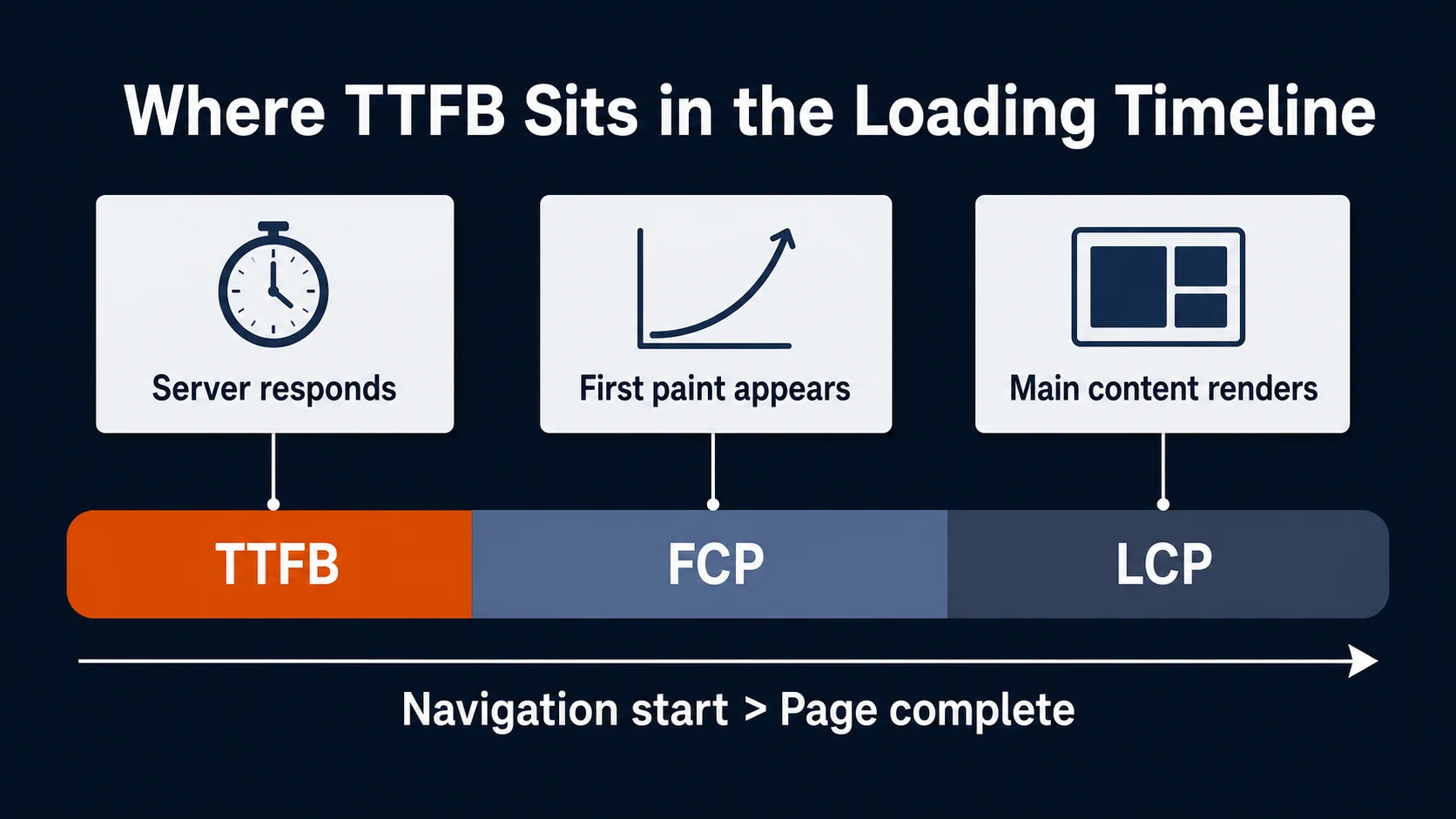
It still matters because other performance metrics happen downstream from it. web.dev describes TTFB as a foundational metric that comes before metrics such as First Contentful Paint and Largest Contentful Paint. If the server response starts late, the browser is already behind before it can discover and load the assets needed to render the page.
That is why TTFB can affect the conditions that make Core Web Vitals optimization harder. Largest Contentful Paint, for example, includes the time from the initial navigation until the largest visible content element is rendered. web.dev breaks LCP into subparts, and TTFB is the first of those subparts. A slow first server response can push the whole LCP timeline later, even if image, CSS, and JavaScript work is otherwise reasonable.
The practical SEO framing is:
- TTFB is not a direct ranking factor to optimize in isolation.
- Poor TTFB can make LCP and other user-experience outcomes worse.
- Strong TTFB does not guarantee strong Core Web Vitals.
- A TTFB problem should trigger diagnosis, not a one-size-fits-all fix.
What Is a Good TTFB?
As a practical target, less than 0.8 seconds is ideal. Lower is better.
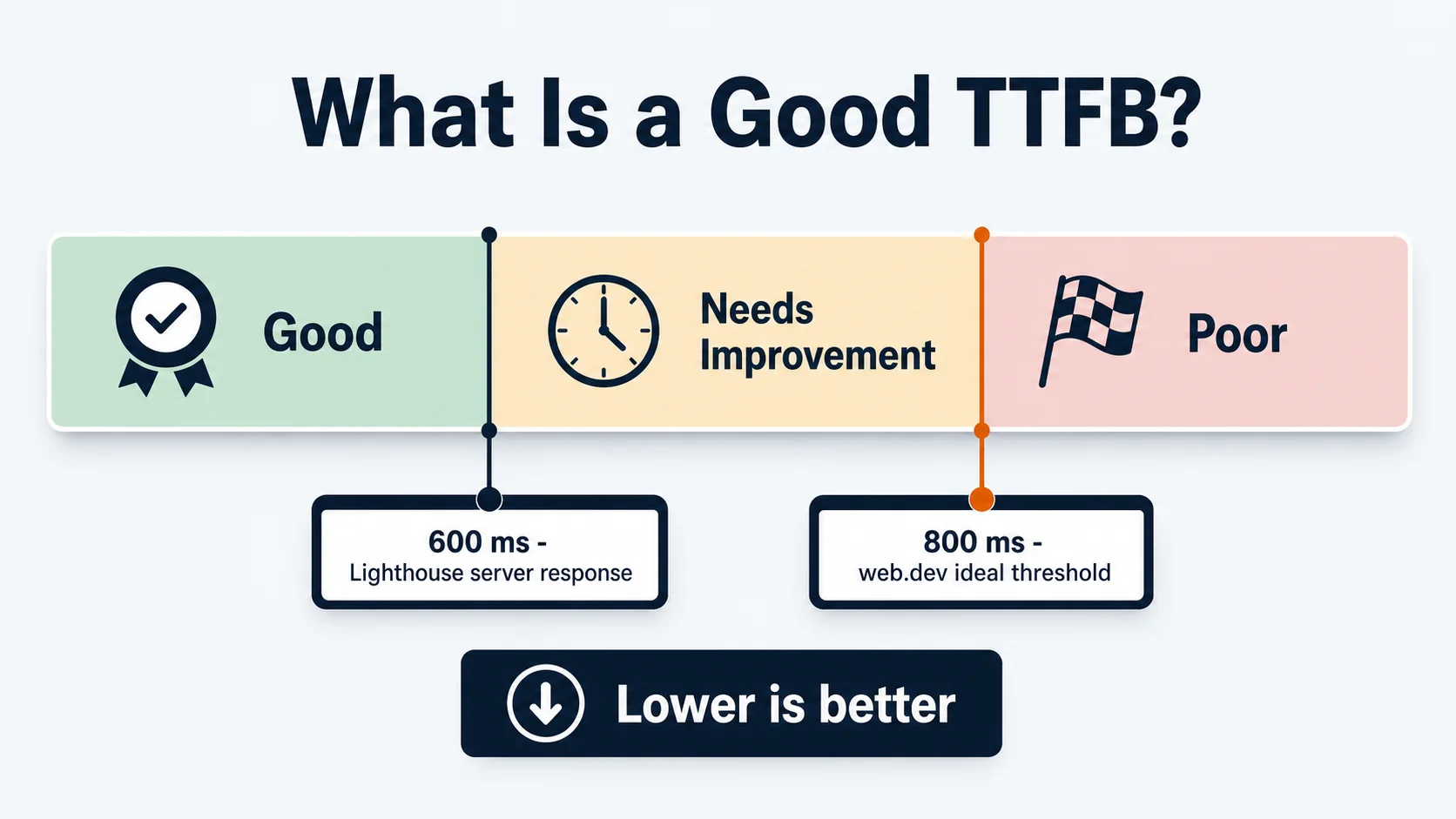
That guidance lines up with web.dev’s rough threshold that most sites should strive for a TTFB of 0.8 seconds or less, while also noting that the threshold should be weighed against how the site delivers its content. Chrome’s Lighthouse documentation uses a smaller 600 ms threshold for the server response time audit because server response time is only part of full TTFB.
Do not treat any one number as proof of the root cause. A static marketing page, a personalized ecommerce page, a logged-in account area, and a dynamic cart page may have very different server-side requirements. A high TTFB is a sign to investigate why the browser is waiting. It is not proof that the host is bad or that a CDN will solve the issue.
How to Measure TTFB With a Time to First Byte Test
Start every time to first byte test by comparing field data and lab data when both are available.
Field data reflects what real users experienced across devices, networks, locations, and sessions. Lab data is a controlled test from a specific device, location, browser, and connection profile. Both can be useful. They answer different questions.
Use tools such as:
- PageSpeed Insights, which can show field and lab data for eligible public URLs.
- Chrome DevTools or Lighthouse for controlled testing and request waterfalls.
- WebPageTest for location, device, connection, and waterfall analysis.
- CDN, server, and application logs when a developer or host can provide them.
When the data conflicts, do not ignore the difference. A lab test might show good TTFB from one location while field data shows poor performance for users farther from the origin server. Or a lab test might miss redirect time if it tests the final URL directly. web.dev notes that full TTFB can include DNS lookups and redirects; Chrome’s Lighthouse server-response audit focuses on a narrower server-response window.
The goal is to determine whether the delay appears consistently, where it appears, and which layer likely owns it.
Is Slow TTFB a Server/CDN Problem or a Site Optimization Problem?
This is the most important diagnostic question.
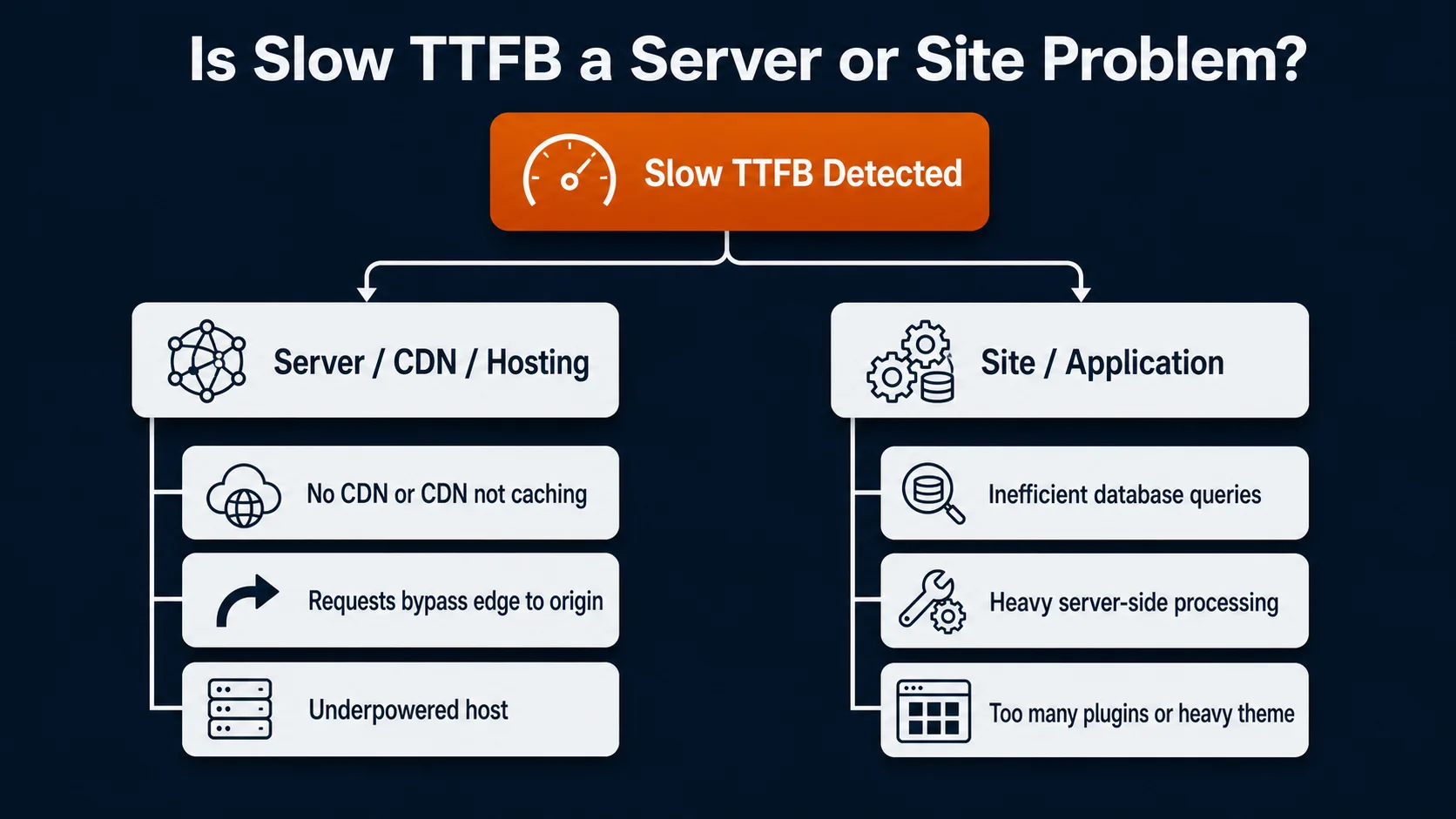
A server, CDN, or hosting issue is possible when:
- The site does not use a CDN, or the CDN is not caching the right content.
- Requests frequently go back to the origin server instead of being served from an edge location.
- The host is low quality, underpowered, or poorly matched to the site’s traffic and platform.
- Server response is slow across many templates.
- Redirect chains add avoidable delay before the final page loads.
- Users far from the origin server see much worse response times.
A site or application optimization issue is possible when:
- The server has to run inefficient database queries before returning the page.
- The platform requires heavy server-side processing for each request.
- WordPress is loaded down by too many plugins or a heavy theme.
- WooCommerce cart, account, pricing, or personalization behavior runs where it is not needed.
- Magento, BigCommerce, WooCommerce, or another ecommerce platform is doing substantial dynamic work before the first response.
- Logged-in, cart, checkout, search, or filtered category pages are much slower than simple static pages.
CDN, cache, and server issues can be the cause, but they are also easy scapegoats. If the site is doing too much work before it can return the page, putting a CDN in front of it may only hide part of the problem. Dynamic ecommerce and WordPress sites often need both infrastructure review and application cleanup.
Common Causes of Slow TTFB
Inefficient database queries
Database work is one of the most common reasons a server takes too long to respond. The server may need to look up product data, pricing, inventory, personalization rules, order history, related products, filters, or content blocks before it can return the page.
Chrome’s Lighthouse documentation lists database-query optimization as one way to improve server response time. In practice, this is often where developer or platform support is needed, especially on large ecommerce sites.
Heavy server-side processing
Some pages require more work than others. A cached blog post may be simple to return. A personalized product page, faceted category page, logged-in account page, or cart page may require more application logic before the page can be sent.
Those features are not automatically wrong. They need to be measured and optimized rather than treated like static pages.
Poor hosting or undersized servers
Host quality still matters. A low-cost shared host, underpowered server, constrained PHP worker setup, or resource-limited environment can slow response times before the site team looks at any frontend issues.
The right fix depends on the diagnosis. Some sites need better hosting or more memory/CPU. Others need fewer server-side tasks. Many need both.
Missing or ineffective caching
Caching can reduce the amount of work the server repeats for every visitor. Full-page caching, object caching, edge caching, and platform-specific caching can all help when configured correctly.

Caching has limits. Cart, account, checkout, search, and personalized pages often cannot be cached the same way as a static page. A cache layer that works for one template may not solve slow TTFB on another.
CDN configuration problems
A CDN can reduce network latency by serving cached content closer to the user. It is especially useful when content can be cached at the edge.
If most requests still go to origin, if cache rules are too conservative, or if URL parameters create unnecessary cache misses, the CDN may do less than expected.
Redirect chains
Redirects can add delay before the browser reaches the final URL. A single necessary redirect is common. Long redirect chains are avoidable technical debt.
This can build up over time after migrations, URL cleanup projects, protocol changes, trailing-slash changes, campaign URLs, and old platform rules. For TTFB diagnosis, check whether the tested URL is the final destination or whether the browser has to hop through multiple URLs first.
WordPress plugin and theme overhead
WordPress can perform well, but plugin and theme overhead can create server-side drag. Chrome’s Lighthouse guidance for WordPress includes choosing a lightweight theme, using full-page caching or a static approach where appropriate, disabling unnecessary plugins, and considering better hosting.
The issue is rarely “WordPress” by itself. It is usually the specific build: plugin count, theme complexity, database state, caching setup, and hosting quality.
How to Reduce TTFB
The right TTFB optimization fix depends on the layer causing the delay.
1. Confirm the measurement
Before changing infrastructure, confirm the issue with more than one view:
- Compare field data and lab data.
- Test the final canonical URL, not only a redirected version.
- Review mobile and desktop separately.
- Test from a location that resembles important users.
- Look at multiple page templates, not only the homepage.
If only one template is slow, the problem may be application logic for that template. If most pages are slow, hosting, origin response, caching, or CDN configuration may be more likely.
2. Check CDN, host, and server details
A non-developer can gather useful context before escalating:
- Is the site on a CDN at all?
- Which host is being used?
- Is the site on shared, VPS, dedicated, cloud, managed WordPress, or platform hosting?
- Are there visible cache headers or CDN headers?
- Are response times worse in regions far from the host or origin?
- Are there long redirect chains before the final URL?
This does not replace developer review, but it helps route the issue to the right owner.
3. Reduce server-side work
If the site is doing too much before sending the first byte, focus on application work:
- Profile slow database queries.
- Remove or defer unnecessary server-side logic.
- Audit plugins, modules, apps, and extensions.
- Review whether personalization, cart, account, or pricing logic runs on pages where it is not needed.
- Use object caching or platform-specific caching where appropriate.
- Simplify heavy templates.
This is where many persistent TTFB issues live, especially on ecommerce and WordPress sites.
4. Improve caching without hiding the root cause
Caching can be high impact, but it should be matched to the page type.
Static marketing pages may be good candidates for full-page or edge caching. Product and category pages may need careful cache rules because pricing, inventory, filters, or personalization can change. Cart and checkout pages need even more caution.
Use caching to reduce repeated work, not to avoid understanding the work the server is doing.
5. Use a CDN where it fits
A CDN can help reduce latency, especially for geographically distributed audiences and cacheable content. It can also reduce load on the origin server.
If every request is dynamic and has to go back to origin, the CDN may have limited impact on the main issue. Check cache hit rates, origin traffic, cache rules, and whether query strings or cookies are causing unnecessary cache bypasses.
6. Clean up redirects
Audit redirect chains and update internal links so they point directly to the final URL. This is especially important after migrations, HTTPS changes, www/non-www changes, trailing slash changes, and content consolidation.
Redirect cleanup is not always the biggest TTFB win, but it is often a clean technical fix that reduces avoidable delay.
WordPress and WooCommerce TTFB Issues
WordPress and WooCommerce deserve special attention because their TTFB issues often come from patterns that build up over time.
Common WordPress patterns include:
- Too many plugins loading on every request.
- Heavy themes that run unnecessary logic.
- Poor full-page or object caching.
- Low-quality hosting for the traffic and plugin stack.
- Database bloat that makes queries slower.
- Autoloaded options that accumulate over time and slow database behavior.
WooCommerce adds more complexity because ecommerce pages often need cart, price, inventory, session, and personalization logic. One recurring pattern is cart-related AJAX behavior firing broadly, including on pages where a cart check may not be necessary. That extra work can add overhead even when the visitor is not actively using the cart.
For a WordPress or WooCommerce TTFB review, look beyond a generic cache plugin recommendation. The better question is what work WordPress is doing before it can send the page. Plugin cleanup, object caching, database cleanup, theme review, AJAX behavior, and host quality may all be part of the answer.
When TTFB Is Not the Whole Problem
TTFB is important, but it is not the whole page speed story.
A page can have strong TTFB and still fail LCP because the LCP image is lazy-loaded, the hero content depends on JavaScript, CSS blocks rendering, fonts delay text display, or the main content is discovered too late. web.dev’s LCP guidance emphasizes that LCP has multiple subparts and that optimizing one part may not improve the final result if another part becomes the bottleneck. For a broader view of how these signals fit together, see our guide to page speed metrics.
The reverse can also be true. A page with mediocre TTFB may still deliver acceptable user experience if the initial HTML arrives predictably and the rest of the critical path is well optimized. Use TTFB as one diagnostic signal inside the larger performance picture.
TTFB Checklist for Marketers and SEO Teams
Before escalating the issue, collect these details:

- Which URLs have poor TTFB?
- Is the issue in field data, lab data, or both?
- Are mobile users affected more than desktop users?
- Does the site use a CDN?
- Who hosts the site?
- Are server or hosting details available?
- Are there redirect chains before the final URL?
- Are slow pages mostly WordPress, WooCommerce, Magento, BigCommerce, or another dynamic platform?
- Are cart, account, filtered category, search, or personalized pages worse than static pages?
- Are CDN/cache/server issues being assumed before application optimization has been checked?
That information helps technical SEO, development, hosting, and CDN teams decide where to look first.
Improve TTFB With the Right Diagnosis
Time to First Byte matters because it sits at the beginning of the loading process. When the first server response is slow, the rest of the page starts late.
The fix is not always obvious. Slow TTFB can come from hosting, CDN, caching, redirects, DNS, database queries, platform logic, plugin overhead, or ecommerce features that require server-side processing. The fastest path to improvement is to identify which layer owns the delay before changing tools or infrastructure.
OuterBox helps teams diagnose technical SEO and performance issues across the full stack: field data, lab data, server response, Core Web Vitals, ecommerce platforms, WordPress, development constraints, and SEO impact. If TTFB is dragging down your performance reports, our web development and SEO teams can help find the real bottleneck and prioritize the fix that will actually improve the page experience.
TTFB FAQ
Is TTFB a ranking factor?
TTFB is best treated as a diagnostic metric, not a direct ranking factor. It still matters because a slow first server response can make downstream user-experience metrics, including LCP, harder to improve.
What is a good TTFB?
Less than 0.8 seconds is a practical ideal target, and lower is better. Treat that number as a signal for diagnosis rather than proof that one specific fix is required.
What causes high TTFB?
High TTFB can come from poor hosting, missing or ineffective caching, CDN configuration, redirect chains, DNS and connection delays, inefficient database queries, heavy server-side processing, or platform-specific issues in WordPress, WooCommerce, Magento, or BigCommerce.
Does a CDN fix TTFB?
A CDN can reduce latency and help cacheable content reach users faster, but it does not automatically fix TTFB. If the site still has to perform slow database queries or heavy server-side work before every response, the CDN may only address part of the problem.